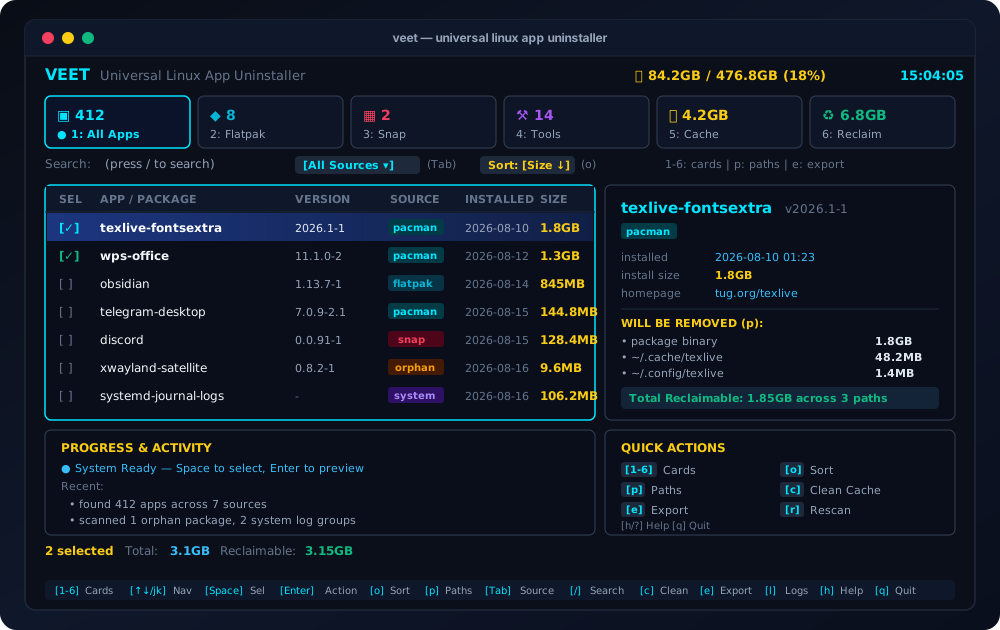
I created github.com/swadhinbiswas/veet on 15 August 2026 after getting tired of disk space disappearing on a machine where I had already removed the apps. The repo is Go, MIT licensed, 150 stars and 6 forks when I pulled these notes, with 30 commits on main and 2 open issues. The short description fits in one line: universal Linux application uninstaller and deep clean residual purger.
Standard removal only touches package managed files under paths like /usr/bin and /usr/share. It leaves user space behind. I kept finding the same leftovers:
~/.config/<app>with settings and credentials~/.cache/<app>with runtime and shader caches~/.local/share/<app>with local databases and state~/.local/state/<app>with session history~/.var/app/<app>for Flatpak data~/snap/<app>for Snap data/var/log/<app>and journal archives
One app never costs much. Fifty apps across native packages, Flatpak, Snap, AppImage, Homebrew, Nix, and language toolchains add up to gigabytes. I built Veet to scan all of those sources at once, show me exactly what would go, and remove it in one confirmed action.
What it scans
Veet queries 17 sources concurrently and skips tools that are not installed at zero cost. The detector files under internal/detector/ name them plainly: pacman.go, apt.go, dnf.go, zypper.go, flatpak.go, snap.go, appimage.go, brew.go, nix.go, npm.go, pipx.go, cargo.go, gem.go, goinstall.go, plus cache.go, orphans.go, and systemlogs.go.
That list covers system managers, sandboxed containers, portable bundles, and language toolchains including npm -g, pipx, cargo, gem, and go install. Orphan detection uses the native queries you would run by hand: pacman -Qdt, apt autoremove, and dnf repoquery --unneeded. Journal handling shells out to journalctl --vacuum for bloated systemd storage alongside rotated compressed logs.
flowchart TD
  SCAN[Concurrent scan of 17 sources] --> STAGE[Stage residual paths]
  STAGE --> REVIEW[Inspect paths in TUI or dry run]
  REVIEW --> CONFIRM[Confirm once]
  CONFIRM --> REMOVE[Atomic removal with single sudo batch]
The stack is small and current. go.mod states Go 1.24.2 with Bubble Tea 1.3.10, Lip Gloss 1.1.0, Cobra 1.10.2, Viper 1.21.0, Afero 1.15.0, and golang.org/x/sys 0.38.0. The layout is easy to walk: main.go holds the Cobra entrypoint, internal/model/ holds types like AppInfo and RemovableFiles, internal/detector/ holds source handlers, internal/uninstaller/ holds staging and filesystem removal, internal/history/ holds the audit log, and internal/ui/ holds Bubble Tea components with a theme engine.
TUI and CLI
I use both modes. The TUI is the daily driver. The CLI is for scripts and audits.
Launch the dashboard:
veet
List everything without interaction:
veet scan
veet scan --json
Remove with a preview of staged paths:
veet clean app1 app2
veet clean code --dry-run
veet clean code --yes
Orphans and caches get their own subcommands:
veet orphans --clean --yes
veet cache --clean --yes
veet history
veet history --clear
main.go defines scan, clean, orphans, cache, history, and tui. The clean command accepts --source to limit matching to one origin, --yes for non interactive runs, and --dry-run to stage and print paths without deleting. orphans and cache accept --json, --clean, and --yes with a 60 second context timeout. history accepts --json, --clear, and --limit with a default of 50 entries. Output tables print APP/PACKAGE, VERSION, SOURCE, and SIZE, with - when size is unknown.
One behavior surprised me the first time: the TUI refuses to run as root. Elevation happens per command through sudo instead. That choice keeps the interactive process unprivileged while system paths still get removed in one batched transaction.
Staging before deleting
Veet never deletes on scan. It stages candidate paths for inspection, then executes after confirmation. runClean in main.go prints each match with reclaimable size and file count, lists every path with a [requires sudo] tag where needed, and totals the run before asking [y/N]. Dry run stops there with the line Dry-run mode: no files or packages were removed.
The comparison in the README states the difference well:
| Task | pacman or apt remove | flatpak uninstall | bleachbit | veet |
|---|---|---|---|---|
| Binary removal | Yes | Yes | No | Yes across 17 sources |
| Config cleanup in config dir | No | No | Partial | Yes, staged for inspection |
| Cache cleanup | No | No | Yes | Yes, staged for inspection |
| Sandbox cleanup in var app and snap dir | No | Partial | No | Yes, deep detection |
| Orphan pruning | Manual query | No | No | Yes, live detection |
| AppImage discovery | No | No | No | Yes |
| Dry run with full path list | Partial | Partial | Yes | Yes with --dry-run |
| Single sudo prompt per batch | Per command | Not applicable | Full root required | Yes |
I rely on the staged list because config directories sometimes hold credentials or project state I want to back up first. Seeing /home/swadhin/.config/Code in the list before anything runs is the whole point.
Search that matches how I think
Press / in the TUI to focus search. The modifiers are few and they compose:
| Syntax | Example | Meaning |
|---|---|---|
@source |
@flatpak |
Limit to one manager |
>size |
>100M |
Larger than given size |
<size |
<50M |
Smaller than given size |
protected:bool |
protected:true |
Filter protected components |
name |
gimp |
Fuzzy match on name |
@flatpak >200M gimp finds Flatpak apps over 200 MB matching gimp. I use @aur >500M after a few months of Arch use to find the packages that grew without me noticing.
Safety
Veet protects glibc, linux, systemd, and the active shell from selection. Config can extend that list. runClean refuses with refusing: %s is a protected system component when a match is protected, and config protected_packages in ~/.config/veet/config.yaml adds project specific entries like a custom kernel module or proprietary driver.
System paths batch into a single elevated transaction instead of prompting per file. Filesystem removal goes through Afero, which also makes the uninstaller testable without touching a real home directory. History appends to ~/.local/share/veet/history.log with date, app, source, status, freed size, and detail, so I can review what left the machine last month.
Themes and config
Veet ships 7 palettes: cyan as default, plus catppuccin, nord, dracula, gruvbox, tokyo-night, and monokai. I run catppuccin because it matches the rest of my terminal. Config lives at ~/.config/veet/config.yaml:
theme: catppuccin
icons: auto
protected_packages:
  - custom-kernel-module
  - my-critical-service
  - proprietary-driver
Icons accept auto, nerd, unicode, or ascii. Auto uses Nerd Fonts unless the session is a raw Linux console or dumb terminal. Unicode falls back to symbols like check and cross marks. ASCII uses plain labels like [pac] and [aur] with zero font requirements. The installer downloads Nerd Font Symbols v3.3.0 with SHA256 verification when fontconfig reports no Nerd Font, and otherwise leaves fonts alone.
Install and remove
Four paths, same binary. Arch users get an AUR package:
yay -S veet
paru -S veet
yay -S veet-git
The script path compiles with -ldflags="-s -w", installs to ~/.local/bin/veet, and writes bash, zsh, and fish completions:
curl -sSL https://raw.githubusercontent.com/swadhinbiswas/veet/main/install.sh | bash
curl -sSL https://raw.githubusercontent.com/swadhinbiswas/veet/v1.1.0/install.sh | VEET_VERSION=v1.1.0 bash
./install.sh
Go users install directly with Go 1.24 or newer:
go install github.com/swadhinbiswas/veet@latest
Manual build uses the Makefile:
git clone https://github.com/swadhinbiswas/veet.git
cd veet
make build
make install
The Makefile has build, run, test with go test -v -cover ./..., fmt, lint through go vet, install to ~/.local/bin, and clean. If ~/.local/bin is missing from PATH, I add export PATH="$PATH:$HOME/.local/bin" to shell rc.
Removal is symmetric:
./uninstall.sh
rm -f ~/.local/bin/veet
rm -rf ~/.local/share/veet ~/.config/veet
The manual path also removes bash, zsh, and fish completion files. I keep audit logs until I am sure a removal did not take something I wanted, then clear them with veet history --clear.
Keys I press
| Press | Effect |
|---|---|
| 1 to 6 | Jump to stat group for All, Flatpak, Snap, Tools, Cache, Reclaim |
| bracket or arrow keys | Cycle stat categories |
| up, down, j, k | Move cursor |
| space | Toggle multi select |
| d | Delete highlighted app with Yes or No popup |
| a | Select all visible rows except protected |
| o | Cycle sort by size, name, source, date |
| p | Toggle staged path inspector |
| / | Focus search |
| Tab | Cycle source filter |
| Enter | Stage and open confirmation preview, Enter again confirms |
| c | Clear audit log in history, quick purge for cache in table |
| e | Export report to apps-report.json |
| r | Rescan all detectors |
| l | Open history |
| s | Open settings and protected registry |
| h | Toggle keybinding overlay |
| Esc | Close modal or blur search |
| q | Quit |
Enter twice to confirm feels right in practice. The first Enter stages and shows the full preview modal. The second runs it.
Limits I accept
Veet is Linux only. It does not manage macOS or Windows apps. It stages paths it can see from detectors and home directory scans, so a weird custom install prefix still needs a manual look. Audit export writes to ~/.local/share/veet/apps-report.json, history caps display at 50 entries unless I raise --limit, and scan contexts time out at 60 seconds per the Cobra handlers.
Contributions go through CONTRIBUTING.md. Detector guides and testing protocols live there.
If your root disk keeps filling after removals, start with veet scan, then veet cache, then one veet clean <name> --dry-run on the largest match. That sequence shows the exact paths before anything leaves the disk.
No comments yet.