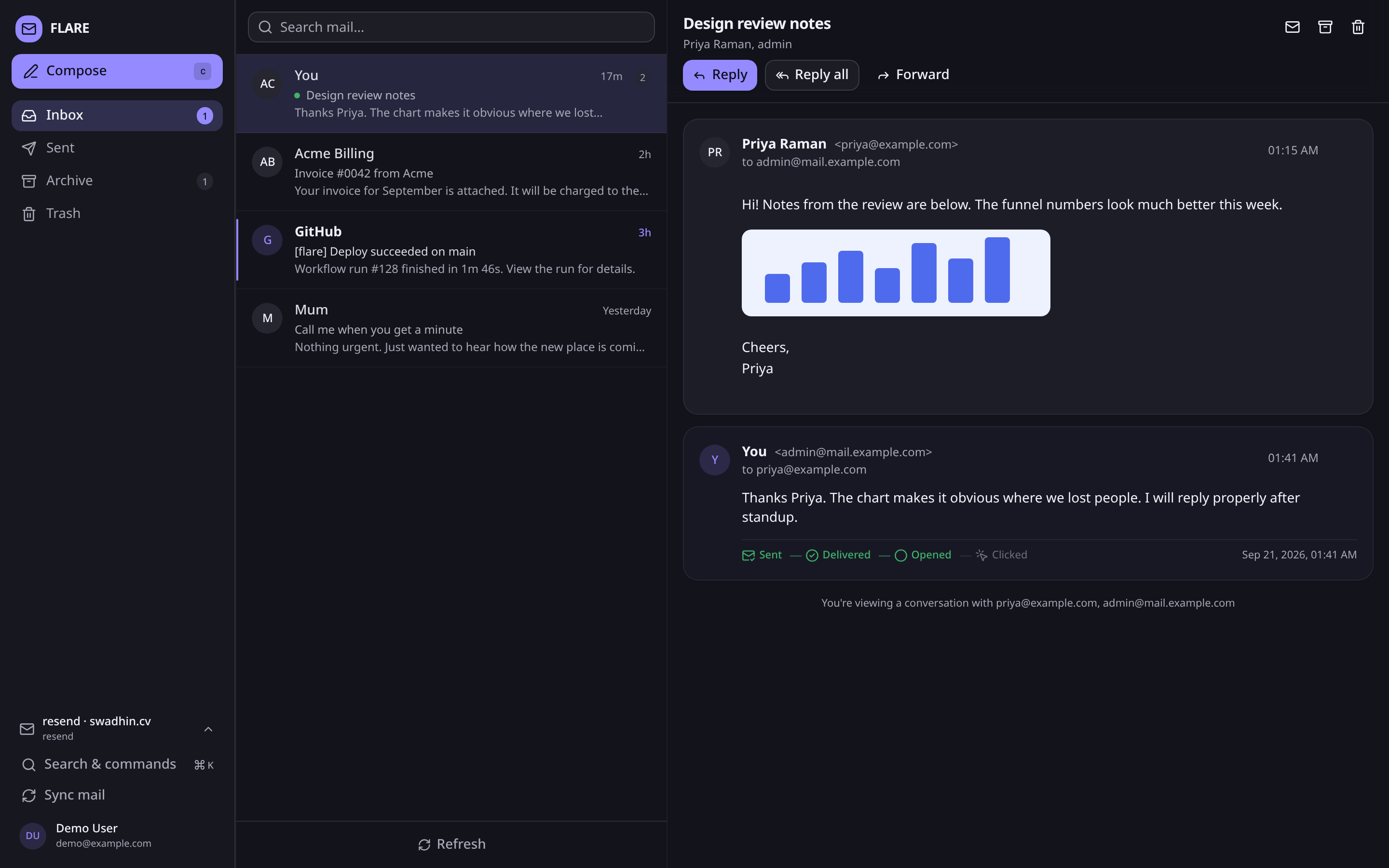
I run my blog on Astro and Turso. I wanted the same shape for mail: one small app I control, mail for my own domain, no mailbox quota to watch, no third party keeping a copy I cannot see. I built Flare for that. Source is at github.com/swadhinbiswas/flare, MIT licensed.
Flare is a self-hosted webmail client for a single owner. It sends through Resend, Maileroo, or any SMTP relay, receives through provider webhooks, keeps everything in Turso, and serves from a single Cloudflare Worker. There is no IMAP bridge. The repo sat at 109 commits on main when I wrote this.
What it is
The runtime is Astro 7.3.3 on @astrojs/cloudflare 14.3.2, with a React 19.3.0 island for the mail client. The database client is @libsql/client 0.18.0 over HTTP. Styling is Tailwind 4.3.3 with shadcn primitives. Node requirement is 20 or newer, package manager is pnpm 11.9.0, tests run on Vitest 5, types on TypeScript 5.9.3.
A Worker has two halves here. Astro server-renders every page behind session middleware, then a React island called MailClient takes over selection, compose, search, and shortcuts. API routes live under src/pages/api and read Turso through @libsql/client/web.
I designed it for a handful of accounts and one login. The whole thing deploys as one Worker with a static asset bundle. It also runs on a laptop with no Cloudflare account, using a local libSQL server.
Flare never speaks SMTP
This part matters before you touch DNS. Flare talks to a provider HTTP API. The provider owns the MX record and the sending reputation. That split is why the app can run on Workers at all.
flowchart LR
  B[Browser Astro SSR plus React island] --> W[Cloudflare Worker]
  W --> T[Turso libSQL]
  W --> S[Blob storage Turso or R2]
  W --> P[Mail provider]
  P --> W
Sending and receiving need different records. SPF and DKIM verify sending. MX points at the provider for receiving. DMARC tells receivers what to do when checks fail. A tracking CNAME is optional for open and click events.
I use a subdomain such as mail.example.com for this. It keeps root domain mail untouched and it makes the records easier to read. Verify the domain in the provider dashboard, publish exactly what it shows, and wait for verified status before pointing a webhook at the app. Settings mirrors that health check inside Flare.
How outbound works
The composer posts to /api/messages/send. Flare validates recipients and attachments first, then writes a messages row with status queued, or scheduled when I picked a delivery time. This happens before the provider call so the message shows in Sent at once. If the provider rejects it, the row flips to failed with a reason.
The provider adapter sends it. Resend goes through its SDK to api.resend.com. Maileroo posts to smtp.maileroo.com/api/v2/emails with an X-Api-Key header. Reply headers carry In-Reply-To and References so the recipient client threads the reply.
Delivery events come back as webhooks. Each one appends to email_events, and messages.status moves forward only:
queued to sent to delivered to opened to clicked
bounced, complained, failed, and canceled are terminal. Opening a thread clears its unread count. Folder badges come from one grouped query.
If a webhook never arrives, the sync path asks the provider for current state. On Resend that is emails.get with last_event. On Maileroo it is webhooks only. The same code backs the Sync button, the one minute background pull while the tab is visible, and the pull on window focus.
How inbound works
Someone sends mail to my domain. Their server looks up MX, which points at the provider. The provider accepts SMTP, checks SPF, DKIM, and DMARC, parses MIME, and stores body and attachments.
Then it notifies Flare. The two providers differ here and I kept both paths explicit:
| Concept | Resend | Maileroo |
|---|---|---|
| Send | POST /emails through SDK 6.28.1 | POST /api/v2/emails with X-Api-Key |
| Delivery webhook auth | Svix signature, whsec_ secret |
HMAC-SHA256 hex in x-maileroo-signature |
| Inbound model | Metadata webhook, then fetch content | Full message in the webhook |
| Inbound auth | Svix signature | One-time validation_url |
| Attachments | Signed URLs, valid 1 hour | Signed URLs in payload, 72 hour retention |
| Status lookup | emails.get reports last_event |
Webhooks only |
| Scheduling | scheduledAt, cancel by id |
scheduled_at, list and delete |
The handler verifies before it touches the database. A bad signature returns 400 and nothing is written. An ingest failure returns 500 so the provider retries. Inserts are idempotent per provider message id.
Body fetch depends on provider. For Resend I call the Receiving API with html_format=cid. For Maileroo I read the payload directly. Attachment bytes copy into my own storage while signed URLs are valid. Maileroo keeps its copy for 72 hours and exposes a deletion_url that Flare calls once everything is stored.
Threading resolves in order: In-Reply-To, then References, then normalized subject plus a shared participant, then a new thread. That fallback keeps mail from clients with broken headers in one place. The message lands with status = received, thread unread and participants update, cid: image references rewrite to authenticated attachment URLs.
sequenceDiagram
  participant U as Sender
  participant P as Provider
  participant W as Flare Worker
  participant T as Turso plus blobs
  U->>P: SMTP to your domain
  P->>W: received webhook
  W->>P: fetch body and attachments
  W->>T: match thread, insert message, store bytes
Provider interface
Everything mail related goes through one interface in src/lib/providers. MAIL_PROVIDER picks the default backend and each account picks its own.
export interface MailProvider {
  readonly id: string;
  readonly label: string;
  readonly defaultWebhookEvents: string[];
  isConfigured(): boolean;
  send(message: ProviderOutboundMessage): Promise<{ id: string }>;
  getMessageStatus(providerMessageId: string): Promise<string | null>;
  listReceived(limit: number): Promise<ProviderReceivedSummary[]>;
  getReceived(providerEmailId: string): Promise<ProviderReceivedEmail>;
  verifyWebhook(payload: string, headers: Headers, secret: string): Promise<ProviderWebhookEvent>;
  listDomains(): Promise<ProviderDomain[]>;
  listWebhooks(): Promise<ProviderWebhook[]>;
  createWebhook(input: { endpoint: string; events: string[] }): Promise<ProviderWebhook & { signingSecret: string }>;
  deleteWebhook(id: string): Promise<void>;
  getMetrics(days: number): Promise<ProviderMetrics>;
}
Optional members declare what an API can do: classifyWebhook, parseInbound, finalizeInbound, cancelScheduled, listScheduled, addSuppression. The UI degrades when one is missing instead of failing. To add a provider I implement MailProvider from src/lib/providers/types.ts and add a case in src/lib/providers/index.ts. SMTP is send-only in this model. Workers cannot listen for inbound SMTP, so an SMTP account sends and receiving stays with the account that owns MX.
Maileroo taught me two lessons during live verification. The Email API needs a Sending Key created per domain under Domains then Sending Keys. An Account API key alone returns invalid API key. Account keys also carry scopes and an IP allowlist. 0.0.0.0/32 allows only the address 0.0.0.0. I use 0.0.0.0/0 plus ::/0 or no allowlist, because Workers egress from dynamic addresses.
For SMTP relays I use implicit TLS on 465. STARTTLS on 587 depends on the runtime upgrading the socket at connect time and some servers reject that.
Accounts
There are two ways to define a mail account and they mix.
From Settings is the quick path. I pick Resend, Maileroo, or SMTP, fill in From address and credentials, and it becomes active. Secrets encrypt with AES-GCM under a key derived from SESSION_SECRET before they reach Turso. Provider keys never sit in clear text. Accounts created this way can be removed from the same card.
From environment suits infrastructure as code. MAIL_ACCOUNTS in wrangler.jsonc is a JSON array where every entry names credentials by env var. wrangler.jsonc takes JSON, so the value is that array as a single string.
node -e "console.log(JSON.stringify(require('./accounts.json')))"
One rule ties both together. The environment account is present as primary unless a database row claims that id. Existing mail never disappears when I add accounts. Threads and messages carry account_id. The active account lives in a cookie and I switch from the sidebar, the mobile drawer, or the account card. Every account has its own webhook endpoint such as /api/webhooks/resend/<account-id> so signatures verify with the right secret.
Profile adds display name used in the From header and a picture uploaded or set from URL. Uploads replace the URL. The From header order is account.fromName, then profile display name, then MAIL_FROM_NAME.
Interface
Three-pane layout with resizable panels. Command palette across every folder. Keyboard shortcuts throughout:
| Key | Action |
|---|---|
| c | Compose |
| r | Reply |
| e | Archive, or move back to inbox |
| # | Trash |
| j / k | Move focus in thread list |
| Enter | Open focused thread |
| / | Focus search |
| Cmd-K or Ctrl-K | Command palette |
| Cmd-Enter | Send from compose |
Shortcuts stay out of the way while I type in inputs or contenteditable.
Four palettes ship in light and dark mode: Proton, Zinc, Nord, Rose. Proton is default. Message bodies follow the palette. Below md the layout collapses to a single pane with a drawer, and /thread/[id] deep-links a conversation. Compose supports attachments and scheduled send, with cancel from the conversation before it leaves.
Settings holds provider tools: webhook registration with signing secret, suppression list management, and 7-day deliverability metrics.
Where state lives
The first migration creates users, sessions, threads, messages, attachments, and email_events. Later migrations add blobs, profile fields, mail accounts, and the account vault.
A few decisions from that schema are worth stating. attachments.message_id is nullable on purpose. Outbound files upload before the message exists and the send handler claims them. Timestamps come from JavaScript as ISO strings, not SQLite datetime('now'), because mixing formats breaks lexicographic ordering. libSQL over HTTP has no interactive transactions, so multi-statement writes use client.batch with write mode. Foreign keys are not enforced over HTTP, so deletes are explicit. A reply keeps its thread folder. Replying to an inbox thread does not file it under Sent. Scheduled messages hold scheduled status until a webhook or cancel moves them.
Blob storage is pluggable. Default keeps attachment bytes in Turso, so R2 is optional. If I enable R2 I add the binding back to wrangler.jsonc and set BLOB_STORE to r2 or auto.
| Concern | Stored in | Why |
|---|---|---|
| Threads and messages | Turso | Small rows, queried constantly |
| Delivery history | email_events |
Append-only audit for the timeline |
| Attachment bytes | blobs or R2 |
Binaries stay out of message rows |
| Avatars | Same blob store | One code path for binaries |
| Sessions | Turso | Server-side revocation, hashed tokens only |
| Active account | Cookie | Per browser, no server cleanup |
Security
Passwords use PBKDF2-SHA256, 210,000 iterations, 16-byte salt, constant-time compare. There is no sign-up page. I create the user from CLI and only the hash reaches Turso.
Sessions store sha256(token) in the database. The cookie holds token.HMAC(SESSION_SECRET, token) so a dump cannot replay. Cookies are HttpOnly, Secure, SameSite=Lax, 30-day sliding expiry, revoked on password change.
Message HTML renders in a sandboxed iframe without allow-scripts, so mail cannot run JavaScript in the app. Attachment and avatar downloads pass an auth check. Storage keys never go public. State-changing endpoints accept JSON only and sessions are SameSite=Lax, which is why Astro origin check stays off: providers post webhooks cross-site.
Login rate limit is in memory per isolate, 10 attempts per 15 minutes per IP. That is fine for one owner. I would put Cloudflare Access in front if I wanted a second gate.
Run it
Node 20 or newer and pnpm. Turso CLI only if I want local libSQL instead of hosted. Provider key only if I want to send.
pnpm install

# Local libSQL server, no Turso account required
PATH="$HOME/.turso:$PATH" turso dev -f local.db -p 8080 &

cp .dev.vars.example .dev.vars
cp .env.example .env

pnpm migrate
pnpm create-admin
pnpm dev
pnpm dev runs Astro on workerd, so bindings and secrets behave like production. The CLI scripts read .dev.vars first and fall back to .env. Only .dev.vars reaches the Worker runtime during dev. .env.example documents the full credential set.
| Command | What it does |
|---|---|
| pnpm dev, dev:stop, dev:status, dev:logs | Dev server lifecycle |
| pnpm build, pnpm preview | Production build, then built Worker on workerd |
| pnpm typecheck | astro check across Astro and TS |
| pnpm test | Vitest over status ranking, mail helpers, MIME building |
| pnpm types | wrangler types regenerates worker-configuration.d.ts |
| pnpm migrate | Applies migrations/*.sql once each |
| pnpm create-admin | Creates or updates user, revokes old sessions |
| pnpm seed-demo | Fictional threads for UI work, refuses remote DB unless forced |
| pnpm deploy | wrangler deploy |
pnpm seed-demo is how I explore UI without real mail.
Deploy
Cloudflare Git integration is the intended path. Connect the repo once and every push to main builds and deploys. No Cloudflare credentials live in GitHub.
Build command is pnpm build. Deploy command is npx wrangler deploy. Root is /. I set NODE_VERSION=22 when the builder picks older Node. Secrets go once under Worker Variables and Secrets: RESEND_API_KEY, RESEND_WEBHOOK_SECRET, TURSO_DATABASE_URL, TURSO_AUTH_TOKEN, SESSION_SECRET, plus Maileroo pair when used.
Then seed production:
TURSO_DATABASE_URL="libsql://..." TURSO_AUTH_TOKEN="..." pnpm migrate
TURSO_DATABASE_URL="libsql://..." TURSO_AUTH_TOKEN="..." pnpm create-admin
Attach the domain under Worker Settings then Domains and Routes, update PUBLIC_APP_URL, then register the webhook from Settings. The page shows the signing secret to store.
The remaining workflow .github/workflows/ci.yml runs tests, typecheck, and build on pushes and pull requests. There is no deploy job. One builder note bit me: pnpm 10 and later refuse install scripts unless approved, which fails with ERR_PNPM_IGNORED_BUILDS. The repo approves esbuild, workerd, @tailwindcss/oxide, and sharp through allowBuilds in pnpm-workspace.yaml, with onlyBuiltDependencies kept for pnpm 10.
Troubleshooting notes
Login returning blank 500 after deploy almost always means missing runtime secrets. I added /api/health for this. It returns { ok, missing[] } with names only and a 503, and login returns that list in its error body. The fix is to set TURSO_DATABASE_URL, TURSO_AUTH_TOKEN, SESSION_SECRET, and provider keys, then redeploy.
Invalid webhook signature on every event means the secret is wrong or the body was parsed before verification. For Resend it must be base64 after whsec_. Paste the exact value.
No inbound mail means checking Settings for domain and webhook health. For Resend the domain must be verified with receiving enabled. For Maileroo the inbound route must point at /api/webhooks/maileroo/<account-id>.
Scheduled cancel can fail with "Email is not scheduled" when Resend accepts send slightly before it flips state. Flare retries that error a few times. If it still fails, the message had not settled yet.
For local webhooks providers cannot reach localhost. I tunnel with cloudflared tunnel --url http://localhost:8787, then register a second dev webhook or use the Settings button and store the returned secret in .dev.vars.
code: 10042 on deploy means R2 binding is declared but R2 is not enabled. Enable R2 or switch BLOB_STORE to database and remove the binding. Types drifting after editing wrangler.jsonc means running pnpm types.
Limits
Single admin user by design, with multiple mail accounts. Message bodies stay forever, there is no retention job yet. Search covers the selected folder in the list and all folders from the palette. Templates, broadcasts, automations, and dedicated IPs from provider APIs stay out on purpose. They are marketing features more than webmail.
There is no IMAP or SMTP bridge, so Flare cannot run from Apple Mail or Thunderbird. SMTP accounts send only. That constraint keeps the Worker model intact, and for my use it is acceptable. If I need desktop clients later, that bridge would be a separate service, not part of the Worker.
If you self-host mail for a custom domain and you are comfortable pointing MX at Resend or Maileroo, Flare gives you a client you can read end to end. Start with a subdomain, verify DNS, register the webhook from Settings, and send your first message to yourself.
No comments yet.